
THE NOONSITE MAP IS TEMPORARILY UNAVAILABLE.
The Noonsite mapping feature allows you to navigate the website easier than ever, quickly see port information and add comments plus post your own favorite anchorages.
To access the map click on the blue map icon on the right edge of your screen.
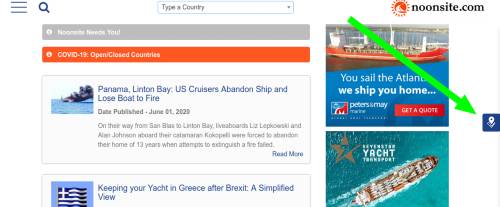
If you have your location settings enabled on your device or web browser the map will zoom to your current location, otherwise it defaults to a view of the Atlantic.
What does the map show?
With the map open, on the left edge of the map screen you will see a filter icon.
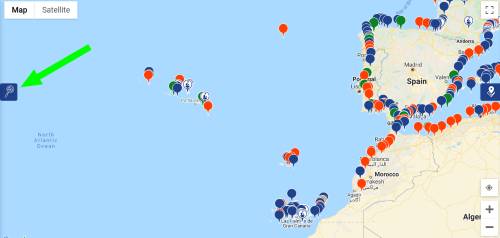
Clicking on the filter icon will open a menu where you can filter your view by your selected criteria. It also acts as a key that defines what the various icons on the map are.
The map currently shows:
- Ports
- Ports of Entry
- C19 Transit/ open ports
The map also shows:
- Marinas
- Boatyards
Finding out information from the map:
The map makes it much easier to see at a glance the breadth of information we have on Noonsite and which ports in each country we hold details of anchorages, marinas, repair facilities, marine and shore services.
You can also quickly see the ports of entry at your next destination to help with planning.
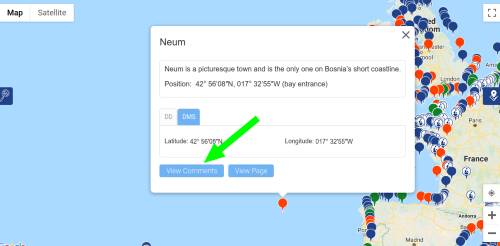
Clicking on a pin for a port, marina or boatyard will open an information box at the bottom of which are two buttons. “View Comments” is where you can read comments left by other sailors and if you are logged in you can add your own comments as well.
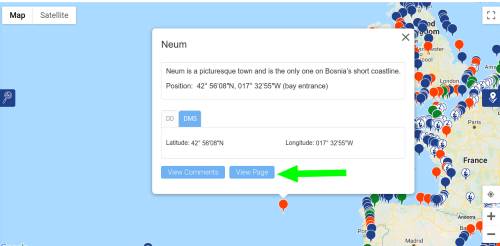
Clicking the “View Page” button takes you to the port page where you can find all the information Noonsite has about that port including related news and reports. If clicking this on a marina or boatyard icon, it will take you to the business listing.
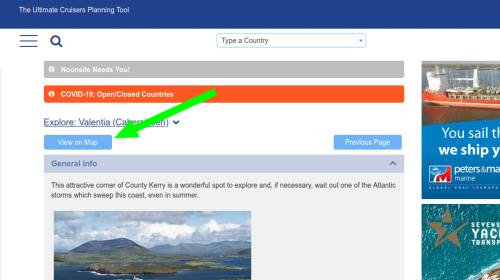
To get to the map from a port page simply click the “View on map” button and the map will open and zoom into your selected port.
Adding my favorite anchorages:
You can add your favorite anchorages by clicking on the map to place the red pin and then clicking on the red pin to post details in the pop-up box.
When posting anchorages please try and include as much useful detail as possible (approach notes, shelter, nature of the bottom, dinghy docks, services ashore, recommendations etc.).
You can also see and leave comments on anchorages posted by other Noonsite members.
Remember:
- You must be logged-in as a paid member (either Basic or Premium) to use the map.
-
Please share your feedback on using the map as we continue to add information and fine tune the features available.
- If you see we have a marina or boatyard missing – contact the team at noonsite@noonsite.com with the details and we’ll add it.
Leave a comment
You must Login or Register to submit comments.
I’m trying to find the annual weather for the south Atlantic so I can plan a trip from Brazil to Gabon. Is this part of your service?
Thankyou
Paxos Grecee Marine Mechanic.
If you ever need a Mechanic in paxos Fliippo is the best, it is always hard to find a Mechanic that actually takes the time to fix something properly.
He takes pride on his work and will find a solution in a timely manner.
+306944131671
The Pin for Sydney ( Harbour ) , NSW , Australia, is quite a way north of the Harbour entrance on the Northern Beaches .
Thank you Matt for picking up on this – now fixed.
I believe Savusavu, Fiji port of entry should have a green map marker.
Thankyou for picking up on that error – all fixed – now green!
Good afternoon, I would like to comment that Costa Rica is closed and only open via air travel for UK, EU and Canada and so far there is no news that it will open it’s land or sea borders any time soon. if you would like more information please contact me cell #8053109246 or email captkarl33@gmail.com have a great day.
Hi Karl, Please see the latest information from the Costa Rica Tourist Board, who indicate that from September 1 private yachts will be allowed to enter the country. See https://www.noonsite.com/place/costa-rica/formalities/#biosecurity-section
Would like to see more icons than just anchorages. Something for boat yards, fuel docks etc.
The PIN location for Stuart (St Lucie River) is on the wrong coast of Florida. It is actually on the East coast north of West Palm Beach.
The current Pin on the map is actually on the Caloosahatchee River at Ft Myers, Florida. There are numerous marinas and chandlers along the river.
Thanks for bringing this to our attention. We have fixed the PIN location.
How do I delete an anchorage that I added?
Hi David, thanks for using the “add an anchorage” function. I am afraid users can’t delete anchorages, I’ll have to do it. Please let me know which one you want removed. You can email me at editor@noonsite.com.
Thanks.
Am I missing something? Where are you showing us?..
Hi Richard, right hand side of screen – little blue icon in a square (of a marker on a map). Just click on that and it will take you to the map.